This is an old revision of the document!
Python Interoperability
Overview
shapeXT utilizes an open, dual-format architecture designed to ensure full data interoperability, long-term reproducibility, and compliance with FAIR data principles (Findable, Accessible, Interoperable, Reusable). The structure files in shapeXT are stored using two fully representation formats:
- JSON (
.jsxt): A plain-text, human-readable format ideal for inspection, manual editing, version control, and seamless integration with external computational workflows. - UBJSON (
.sxt): Universal Binary JSON format designed for fast I/O, reduced disk space, and rapid loading of high-atom-count data and voxel data (e.g. molecular orbitals, electron density).
Because both formats share an identical data schema, structural parameters, visual representation styles, and metadata can be inspected, modified, or generated programmatically using standard scripting languages such as Python.
Prerequisites: The standard Python library module json is used to parse the textual shapeXT file format (.jsxt). To additionally support the binary shapeXT file format (`.sxt`), the py-ubjson Python package needs to be installed (e.g., by pip install py-ubjson).
Example 1: File Format Conversion (.jsxt <-> .sxt)
The following Python script demonstrates how to convert bidirectionally between the human-readable .jsxt text format and the binary .sxt format. The converted output file can later be loaded with shapeXT.
#!/usr/bin/env python3
#
# A simple Python script for shapeXT file conversion (.jsxt <=> .sxt)
# to demonstrate the open shapeXT file format (UBJSON/JSON-based).
#
# Usage: python convert_shapeXT.py input.[j]sxt output.[j]sxt
#

# ubjson may require: pip install py-ubjson
import argparse, json, ubjson

def load_shapeXT_file(filepath):
    if filepath.endswith('.sxt'):
        with open(filepath, 'rb') as f:
            return ubjson.load(f)
    with open(filepath, 'r') as f:
        return json.load(f)

def save_shapeXT_file(data, filepath):
    if filepath.endswith('.sxt'):
        with open(filepath, 'wb') as f:
            ubjson.dump(data, f)
        return
    with open(filepath, 'w') as f:
        json.dump(data, f)

if __name__ == '__main__':
    parser = argparse.ArgumentParser(description='Convert shapeXT files between .jsxt and .sxt formats.')
    parser.add_argument('input_file', help='Input shapeXT file (.jsxt or .sxt)')
    parser.add_argument('output_file', help='Output shapeXT file (.jsxt or .sxt)')
    args = parser.parse_args()

    data = load_shapeXT_file(args.input_file)
    save_shapeXT_file(data, args.output_file)
Example 2: Visual Manipulation
Because shapeXT exposes its structural entities directly in the JSON/UBJSON data tree, users can manipulate chemical parameters, representation radii, and colors prior to rendering. This enables integration into automated pipelines across large crystallographic or structure datasets.
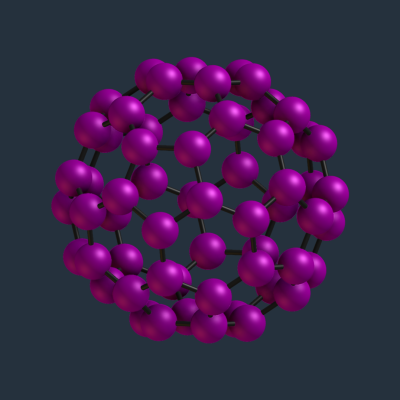
The example script below iterates through all structures, selects Carbon atoms by their atomic number ($Z = 6$), updates their displayed radius to 0.50 Å, and assigns a magenta color by an RGBA vector [255, 0, 255, 255].
#!/usr/bin/env python3
#
# A small Python script to demonstrate shapeXT file format interoperability:
# The script resizes all carbon atoms to 0.50 A and colors them pink.
#
# Usage: python adjust_carbons.py input.[j]sxt output.[j]sxt
#

# ubjson may require: pip install py-ubjson
import argparse, json, ubjson

def load_shapeXT_file(filepath):
    if filepath.endswith('.sxt'):
        with open(filepath, 'rb') as f:
            return ubjson.load(f)
    with open(filepath, 'r') as f:
        return json.load(f)

def save_shapeXT_file(data, filepath):
    if filepath.endswith('.sxt'):
        with open(filepath, 'wb') as f:
            ubjson.dump(data, f)
        return
    with open(filepath, 'w') as f:
        json.dump(data, f)

if __name__ == '__main__':
    parser = argparse.ArgumentParser(description='Resizes the atoms in a shapeXT file.')
    parser.add_argument('input_file', help='Input shapeXT file (.jsxt or .sxt)')
    parser.add_argument('output_file', help='Output shapeXT file (.jsxt or .sxt)')
    args = parser.parse_args()

    data = load_shapeXT_file(args.input_file)

    # resize all carbon atoms to radius 0.50 A and color magenta
    for structure in data["structures"]:
        for atom in structure["atoms"]:
            # apply to all Carbon atoms
            if atom["type"] != 6:
                continue
            print(f"resizing atom {atom["tag"]}...")
            # set the radius to 0.50 A
            atom["radius"] = 0.50
            # set the color to magenta (RGBA)
            atom["color"] = [255, 0, 255, 255]

    save_shapeXT_file(data, args.output_file)
Before
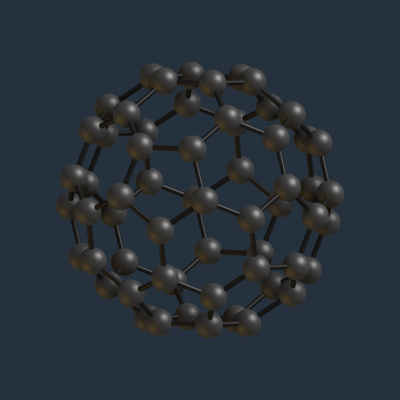
After