This is an old revision of the document!
Troubleshooting
Welcome to the troubleshooting page. Since shapeXT heavily relies on modern graphics APIs (specifically Vulkan 1.3 and above) to achieve its high rendering performance, most common issues are related to graphics drivers or hardware compatibility.
Please find known issues and solutions for your operating system below. If your problem is not listed here, please press F8 inside the application to submit a bug report, or contact me via email at mail@shapeXT.com.
General
Windows
shapeXT closes immediately after launch (Intel Arc Graphics)
- Symptom: You launch
shapeXT.exe, the main window briefly flashes with a white background, and then immediately closes/crashes. - Cause: This is a known bug in the current beta version (v2026.06.0) related to Vulkan initialization on systems using integrated Intel Arc graphics.
- Solution: A fix was provided in version v2026.06.1.
Verifying Vulkan Support
- Symptom: shapeXT fails to start, throws a graphics-related error, or you suspect your drivers are outdated.
- Cause: Your system might be missing proper or up-to-date Vulkan drivers.
- Solution: You can verify your Vulkan support using the free diagnostic tool GPU-Z.
- Download and run TechPowerUp GPU-Z.
- Look at the bottom of the main window.
- Check if the box next to Vulkan (in the “Computing” or “Technologies” section) is ticked with a green checkmark (red box).
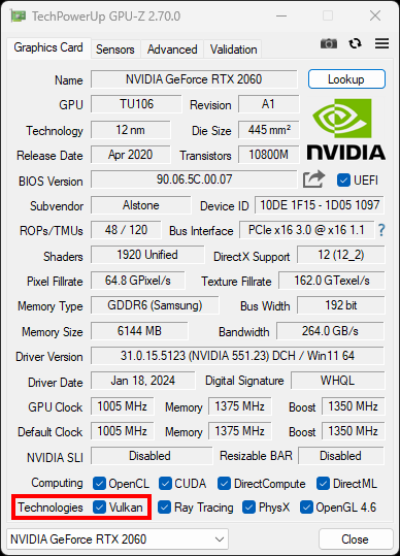
- If it is not checked, please download and install the latest graphics drivers directly from your GPU manufacturer's website (NVIDIA, AMD, or Intel).
macOS
Application fails to launch
- Symptom: shapeXT cannot be opened, crashes immediately, or macOS displays an architecture/compatibility warning.
- Cause: shapeXT has been highly optimized for modern Mac hardware and only supports Apple Silicon chips (M-series).
- Solution: Older Intel-based Macs are not supported. To run shapeXT, you need a Mac with an Apple Silicon processor. You can verify your processor by clicking the Apple Logo in the top-left menu bar and selecting About This Mac.
GNU/Linux
Application does not start / terminal shows Vulkan errors
- Symptom: Running the
shapeXT.shscript results in a crash, often accompanied by terminal output mentioning “Vulkan”, “VK_ERROR”, or “instance creation failed”. - Cause: Missing or misconfigured Vulkan drivers on your Linux distribution.
- Solution: You can easily test if Vulkan is set up correctly on your system by using the vkcube utility.
- Open your terminal.
- Run the command:
vkcube(you may need to install thevulkan-toolspackage first via your package manager, e.g.,sudo apt install vulkan-tools). - If a window opens showing a spinning 3D cube, your Vulkan installation is working properly and shapeXT should run.
- If
vkcubefails to run or throws an error, you need to install the correct Vulkan drivers for your graphics card (e.g.,mesa-vulkan-drivers,vulkan-radeon, or the proprietary NVIDIA drivers depending on your distribution).